Your browser sends the WordPress login cookie with every request to your site. Yet a plain fetch('/wp-json/wp/v2/users/me') from a logged-in page still comes back as a logged-out visitor. The missing piece is the nonce, and it’s the whole point of how cookie auth works in the REST API.
I kept asking “but what actually happens?” So I traced it through core, built a small demo plugin, and wrote down what I found. This post covers the full request lifecycle, what happens when a nonce expires, and why wp.apiFetch handles all of it for you while plain fetch() doesn’t.
How cookie authentication works
When you log in, wp_set_auth_cookie() sets two kinds of cookie:
Set-Cookie: wordpress_sec_a1b2c3=anam|1761100000|Tk9...|5f3e...; path=/wp-admin; secure; HttpOnly
Set-Cookie: wordpress_logged_in_a1b2c3=anam|1761100000|Tk9...|9c1d...; path=/; secure; HttpOnly
The value has four parts: username | expiration | session_token | hmac. The wordpress_sec_* cookie only covers /wp-admin and the plugins path, so the browser never sends it to /wp-json/. The wordpress_logged_in_* cookie has path=/, so it goes out with every request, including REST calls.
A few details matter:
HttpOnlymeans JavaScript can’t read the cookie, but the browser still sends it.- The HMAC includes part of your password hash, so changing your password invalidates it.
- The session token lives in the
session_tokensuser meta. Logging out deletes it, which kills the cookie on the server side. - Expiry is 2 days by default, or 14 days with “Remember me”.
Your JavaScript doesn’t do anything to send it. fetch() defaults to credentials: 'same-origin':
GET /wp-json/wp/v2/users/me HTTP/1.1
Host: example.com
Cookie: wordpress_logged_in_a1b2c3=anam|1761100000|Tk9...|9c1d...
On the server, wp_get_current_user() runs the determine_current_user filter. For a REST request the validator that matches is wp_validate_logged_in_cookie(). It checks the expiry, that the user exists, the HMAC and the session token. If all pass, the auth_cookie_valid action fires, and the REST API notes that this user was logged in by a cookie.
So far the cookie alone has identified you. The next step is where the REST API decides whether to trust it.
Why the cookie isn’t enough: the nonce check
Because the browser sends the cookie automatically, a page on evil.com can make your browser send a request to your site, and the cookie may go with it. That’s Cross-Site Request Forgery (CSRF). The nonce blocks it: evil.com can’t read your pages, so it can’t get the nonce.
The check lives in rest_cookie_check_errors(), hooked on rest_authentication_errors. Simplified:
function rest_cookie_check_errors( $result ) {
	if ( ! empty( $result ) ) {
		return $result; // another auth method (App Passwords, JWT) already decided
	}

	global $wp_rest_auth_cookie;
	if ( true !== $wp_rest_auth_cookie || ! is_user_logged_in() ) {
		return $result; // no cookie login, nothing to check
	}

	$nonce = $_REQUEST['_wpnonce'] ?? $_SERVER['HTTP_X_WP_NONCE'] ?? null;

	if ( null === $nonce ) {
		wp_set_current_user( 0 ); // no nonce: the cookie is ignored
		return true;
	}

	if ( ! wp_verify_nonce( $nonce, 'wp_rest' ) ) {
		return new WP_Error( 'rest_cookie_invalid_nonce', 'Cookie check failed', [ 'status' => 403 ] );
	}

	rest_get_server()->send_header( 'X-WP-Nonce', wp_create_nonce( 'wp_rest' ) );
	return true;
}
A cookie only counts when a valid nonce comes with it
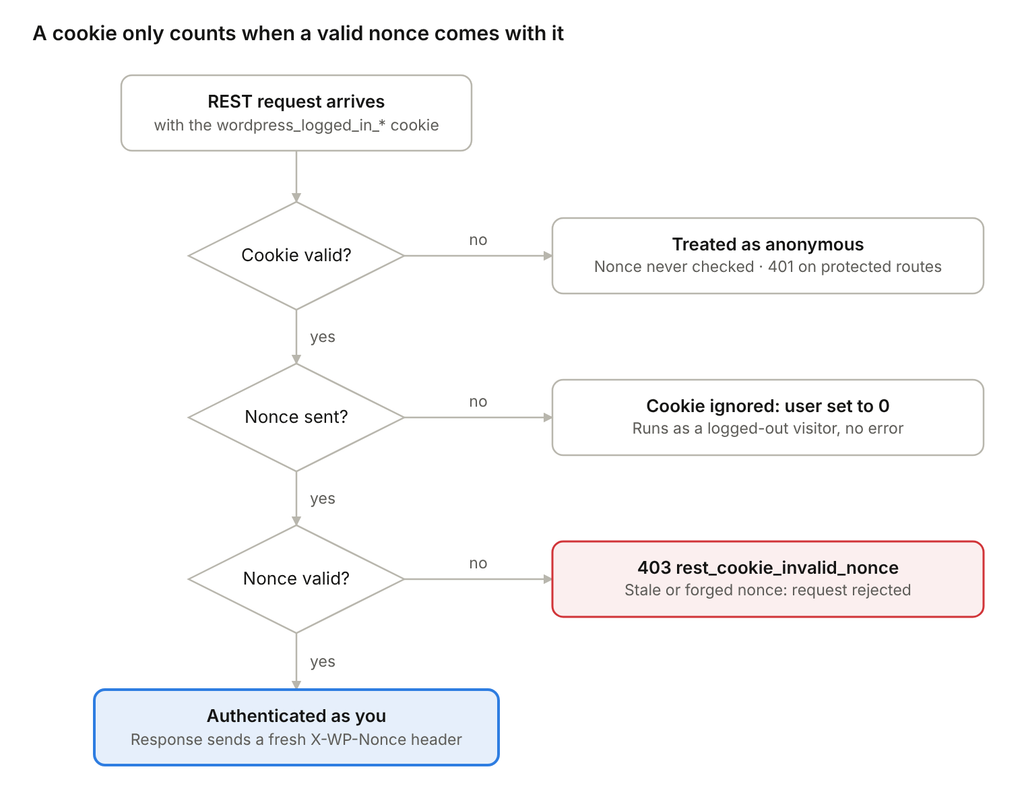
The surprising branch is the middle one: a cookie with no nonce isn’t an error. WordPress quietly treats you as logged out, which is why that first fetch() came back anonymous.
Getting the nonce into JavaScript
The nonce is created in PHP, so it has to be printed into the page. The current best practice is wp_add_inline_script():
function enqueue_custom_script() {
	wp_enqueue_script( 'my-custom-js', plugin_dir_url( __FILE__ ) . 'custom.js', [], '1.0', true );

	$settings = [
		'nonce'   => wp_create_nonce( 'wp_rest' ),
		'restUrl' => esc_url_raw( rest_url() ),
	];

	wp_add_inline_script(
		'my-custom-js',
		'var myRestSettings = ' . wp_json_encode( $settings ) . ';',
		'before'
	);
}
add_action( 'wp_enqueue_scripts', 'enqueue_custom_script' );
Then send it as a header:
fetch( myRestSettings.restUrl + 'wp/v2/posts', {
	method: 'POST',
	headers: {
		'X-WP-Nonce': myRestSettings.nonce,
		'Content-Type': 'application/json',
	},
	body: JSON.stringify( { title: 'Hello' } ),
} );
Four details are worth remembering:
- Use
'before'. The default is'after', which prints your settings after your script has already run. - Use
wp_json_encode(). It escapes correctly and keeps data types. - Use
rest_url(), not a hardcoded/wp-json/. Sites with plain permalinks serve the API at?rest_route=, and the prefix can be changed with therest_url_prefixfilter. - Save
wp_localize_script()for translations. You’ll still see it in older code, but it turns values into strings, sotruearrives in JS as"1".
Whatever you print this way is visible in the page source. That’s fine for a nonce, which is tied to the user’s session and expires. Never print API keys or secrets this way.
What happens when the nonce expires
A wp_rest nonce lasts 12–24 hours, and plain fetch() won’t tell you when it has expired unless you check.
wp_create_nonce() hashes a 12-hour “tick” together with the action, the user ID and the session token. wp_verify_nonce() accepts the current tick and the previous one. Ticks are fixed blocks of time, not counted from page load, so a page loaded near the end of a tick can stop working after just over 12 hours.
Say a tab sits idle overnight. The login cookie is still valid, but the nonce printed in the page isn’t:
HTTP/1.1 403 Forbidden

{ "code": "rest_cookie_invalid_nonce", "message": "Cookie check failed", "data": { "status": 403 } }
The catch is that fetch() doesn’t throw on a 403. The promise resolves with res.ok === false. If your code goes straight to .then( r => r.json() ), it treats the error object as data. The user clicks Save, nothing is saved, and they see no error.
If the cookie has also expired, you get a different error. WordPress can’t identify a user from the cookie, so it never checks the nonce. The request runs as anonymous: protected endpoints return a 401, and GET requests return public data only.
| Situation | Result |
|---|---|
| Nonce valid, cookie valid | Works |
| Nonce expired, cookie valid | 403 rest_cookie_invalid_nonce. A new nonce fixes it |
| Cookie expired | Anonymous request: 401 on protected endpoints. The user has to log in again |
Does reloading the page fix it?
Yes, as long as the HTML comes fresh from PHP. On reload the browser sends the still-valid cookie, WordPress identifies you, wp_create_nonce( 'wp_rest' ) runs again, and a new nonce is printed in the page.
Three things can get in the way:
- Page caching. If a cache serves the HTML instead of PHP, you get the same old page with the same expired nonce. Normally this isn’t a problem: WordPress sends no-cache headers to logged-in users, and most caches (WP VIP’s edge cache included) skip anyone with a
wordpress_logged_in_*cookie. If a reload doesn’t fix a 403, check the caching first. - Back/forward buttons. The browser can restore the old page from memory without asking the server. A real reload asks the server again.
- Lost work. Reloading wipes whatever the user was typing. That’s why the better fix is to refresh the nonce in place, without a reload.
Let apiFetch handle it
Add wp-api-fetch as a dependency and core handles the root URL, the nonce and the refresh:
wp_enqueue_script( 'my-app', plugins_url( 'app.js', __FILE__ ), [ 'wp-api-fetch' ], '1.0', true );wp.apiFetch( { path: '/wp/v2/posts', method: 'POST', data: { title: 'Hello' } } );It works because core prints this setup after the library (view source and you’ll find it):
<script>
wp.apiFetch.use( wp.apiFetch.createRootURLMiddleware( "https://example.com/wp-json/" ) );
wp.apiFetch.nonceMiddleware = wp.apiFetch.createNonceMiddleware( "a1b2c3d4e5" );
wp.apiFetch.use( wp.apiFetch.nonceMiddleware );
wp.apiFetch.use( wp.apiFetch.mediaUploadMiddleware );
wp.apiFetch.nonceEndpoint = "https://example.com/wp-admin/admin-ajax.php?action=rest-nonce";
</script>
That’s the same wp_create_nonce( 'wp_rest' ) and rest_url() you’d pass by hand, already done for you.
The nonce refresh is the part that matters for expired nonces. Simplified from @wordpress/api-fetch:
return enhancedHandler( options ).catch( ( error ) => {
	if ( error.code !== 'rest_cookie_invalid_nonce' ) {
		return Promise.reject( error );
	}
	return globalThis.fetch( apiFetch.nonceEndpoint )   // the cookie goes along
		.then( ( response ) => response.ok ? response.text() : Promise.reject( error ) )
		.then( ( text ) => {
			apiFetch.nonceMiddleware.nonce = text;           // later requests use it
			return apiFetch( options );                       // retry once, quietly
		} );
} );
On the server, the admin-ajax handler is one line: exit( wp_create_nonce( 'wp_rest' ) );. In the Network tab you see three requests: a 403, the admin-ajax call, then the retry succeeding. Your code just sees the promise resolve.
Two limits:
- It can’t log anyone back in. If the cookie has expired, the admin-ajax call fails and
apiFetchrejects with the original error. - It overrides your nonce header. I found this while reading the source. The nonce middleware only leaves your own
X-WP-Noncealone if it matches its current nonce. Otherwise it replaces yours with its own.
Doing it yourself with fetch()
Plain fetch() can recover from an expired nonce too. apiFetch only uses things core already gives you, so you can copy what it does.
1. Keep the nonce current as you go. Every successful request that uses a cookie plus a valid nonce returns a current nonce in the X-WP-Nonce response header:
const res = await fetch( url, { headers: { 'X-WP-Nonce': settings.nonce } } );
settings.nonce = res.headers.get( 'X-WP-Nonce' ) || settings.nonce;
This doesn’t help if the tab sits idle past the nonce’s lifetime.
2. Refresh when it fails, then retry once. This is what apiFetch does:
async function wpFetch( path, options = {}, retried = false ) {
	const res = await fetch( settings.root + path, {
		...options,
		headers: { 'Content-Type': 'application/json', ...options.headers, 'X-WP-Nonce': settings.nonce },
	} );

	settings.nonce = res.headers.get( 'X-WP-Nonce' ) || settings.nonce;

	if ( res.status === 403 && ! retried ) {
		const err = await res.clone().json().catch( () => ( {} ) );
		if ( err.code === 'rest_cookie_invalid_nonce' ) {
			const nonceRes = await fetch( settings.ajaxUrl + '?action=rest-nonce' );
			if ( ! nonceRes.ok ) {
				throw new Error( 'Session expired, please log in again' );
			}
			settings.nonce = await nonceRes.text();
			return wpFetch( path, options, true );
		}
	}

	if ( ! res.ok ) {
		throw await res.json();
	}
	return res.json();
}
Add 'ajaxUrl' => admin_url( 'admin-ajax.php' ) to your inline settings in PHP and it works. At a minimum, always check res.ok, so a failed request shows an error instead of failing silently.
Try it yourself: the REST Auth Demo plugin
I built a small plugin so you can watch all of this happen instead of taking my word for it. It adds two endpoints (a public GET /demo/v1/whoami and a logged-in-only POST /demo/v1/note) and a [rest_auth_demo] shortcode. The shortcode renders a panel that sends the same requests three ways: plain fetch(), a fetch() refresh wrapper, and wp.apiFetch.
Open DevTools → Network, log in, and try these:
- Send the cookie without a nonce. GET /whoami · no nonce returns
anonymous, and POST /note · no nonce returns a 401. - Send a bogus nonce. You get
403 rest_cookie_invalid_nonce, even on the public endpoint. - Simulate expiry. Click Simulate expired nonce, then each POST. WordPress answers an invalid nonce exactly like an expired one. Plain fetch keeps failing until you reload, the wrapper refreshes and retries, and
apiFetchshows two requests and then succeeds. - Watch a real expiry. Add
define( 'REST_AUTH_DEMO_NONCE_LIFE', 60 );towp-config.php.wp_restnonces then last 30–60 seconds, and the panel counts down to when the page nonce expires. - Log out in another tab. Now nothing can recover, because no client-side code can recreate a login.
It’s for local or dev sites only. The plugin needs WP 6.1+, because it uses the $action argument on the nonce_life filter to shorten only wp_rest nonces.
Takeaways
- The cookie says who you are. The nonce proves the request came from your site. The REST API needs both.
- A cookie without a nonce isn’t an error. WordPress quietly treats you as logged out.
- Pass data to JS with
wp_add_inline_script( ..., 'before' )+wp_json_encode()+rest_url(). Savewp_localize_script()for translations. - Nonces last 12–24 hours.
fetch()resolves on a 403, so always checkres.ok. - Use
wp.apiFetchwhenever you can. If you use plainfetch(), handlerest_cookie_invalid_nonceyourself. - Cookie auth is same-origin only. For headless or external apps, use Application Passwords or JWT.